
How to Launch a Discount on Shopify - Comprehensive Guide
Quick Answer:
A Shopify discount boosts conversion and helps in retaining customers. By giving your customers the best deal, you buy their loyalty, and the process of launching a successful discount is not so technical.
Introduction
A discount on Shopify involves a lot of technicalities. This means setting up a discount code promotion and setting values and time schedules. Success depends on clear targeting and how the offer looks to customers.
Struggling to increase sales or move slow inventory? Learning how to launch a discount on Shopify can turn a quiet store into a high-converting one. But simply adding a discount isn’t enough; you need the right setup and timing to see results.
In this guide on how to launch a discount on Shopify, we will learn a lot. You will learn how to set up discounts step by step and apply proven strategies to maximize conversions, attract customers.
A comprehensive guide to launching a discount on Shopify
Learn how to launch a discount campaign on your Shopify business with this comprehensive guide:
1. Log in to your Shopify admin account
Let’s start from the top by logging into the Shopify admin dashboard, and once you’re inside, you can see the store overview, where you can manage products, orders, campaigns, and so on.
On the left-hand menu, look for the discount section. This is where all the discount codes, which are the codes that customers input to get their orders comped, are located.
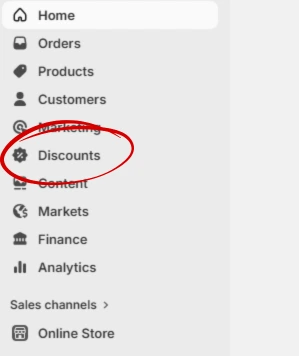
2. Click on the discount section
After you successfully find the discount section, you will see these:
Existing discount codes
Automatic Shopify discounts
Expired promotion
Scheduled discounts
If you do not have any existing discounts, click "Create Discount" to launch a new money-making promotion.
3. Choose your discount type
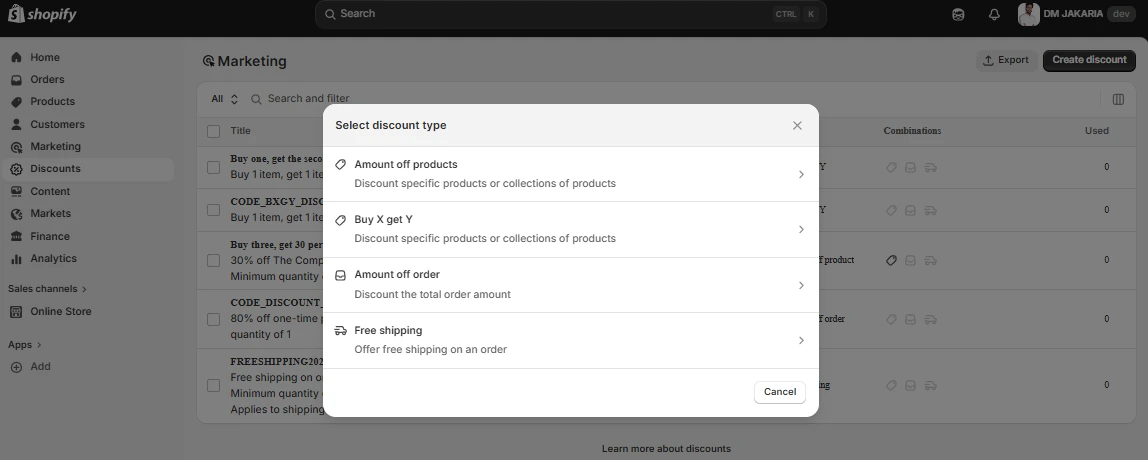
Shopify sales campaign gives the luxury of choosing what type of discount you want based on your sales goals.
The available options are:
Percentage discount (e.g., 20% off)
Fixed amount discount (e.g., $10 off)
Free shipping discount
Buy One Get One (BOGO)
Choose the best discount strategy for Shopify stores that aligns with your ecom brand and launch.
But wait..
Why are you offering a discount?
Is it to increase average order value (AOV)? (AOV is the average amount a customer spends per transaction).
Is it to move old inventory that is taking up space in your warehouse?
Is it to acquire new customers who are hesitant to try a new brand? Each goal requires a different type of discount. For example, if you want to increase AOV, a "Spend $100, Save $20" code is more effective than a flat 10% off code.
Also you can use bulk discount apps for Shopify store that offer wide range of discount campaign management in minutes.
Here are some tips for the successful launch of a discount:
Want to attract new customers → Use a percentage discount
Want to increase order value → Use minimum purchase discount
Want to clear inventory → Use BOGO
4. Name the discount
This is the part where it gets fun. Give a unique but easy discount code that is relevant to your brand and the campaign you have in mind. Something like XMASX20 that is clear and relays the campaign message just from the code itself.
5. Pick the discount value
Shopify allows you to set any percentage of your choice which means you can do 20% off on orders above $200 or free shipping or even 10% off on the whole store if you’re feeling generous.

You can also offer a fixed amount off on certain orders or create a combination of products and launch a discount on that to make your order look extra special and like the best deal on the market. The fixed amount could be shown as $30 compounded on orders above $100.
Choose the value that best fits your financial strategy to increase your profit margin and drive your sales.
Now… There are two ways to successfully launch a discount on Shopify.
Automatic Shopify discounts apply at checkout without customers needing to enter a code. They’re ideal for:
Buy 1 Get 1 (BOGO) deals
Quantity-based discounts (e.g., buy 3, get 20% off)
Sitewide or collection-based promotions
The shopify discount code is especially smart for e-commerce businesses that run their sales campaign with Email and SMS marketing
6. Schedule the Discount Campaign for Launch
Finally, the time is here to set the time. You give a start date and end date, which means that you’re telling Shopify when to stop making the discount code valid, and it makes it easy for you to schedule your promotion and not worry about turning it off manually.
This is especially important for holiday sales like Christmas, Black Friday, and flash sales.
Once you have configured all of the above steps, click on Save Discount. This means that your Shopify discount code is now live and is ready to generate sales.
Your discount is now live and ready to be used at checkout.
But what to do next?
Test the code yourself by adding products to your cart and entering the code at checkout.
Confirm that the discount is not applying to products you intended to exclude.
Check that the discount shows up clearly on mobile devices.
You can promote your discounts through multiple media platforms, such as posters, email marketing, pop-ups, and ads.
Special Shopify Benefits for Its Users
Shopify sales campaigns allow its customers to apply specific conditions tailored to every business’s personal strategy for marketing. This condition helps control the profitability and also attract the right customers to not just look around but also stay for the long run.
Some conditions that Shopify allows are:
Minimum purchase amount - This means that customers are not eligible for the discount until and unless they buy a certain amount: 10% off on orders above $50
Minimum quantity - This condition is best suited for inventory clearing. This means that the customer is eligible if they buy a certain number of products, like free shipping on orders above 2 products, or buy 2 times and get 10% off.
Specific collections - This is very useful for brands that work in the fashion industry, where they can launch specific discounts on their collections.
Specific products - This is highly recommended if your brand is launching a new product and you want to test the waters with your customers' tastes.
Customer eligibility: You can also offer discounts tailored to specific customer groups, such as 15% off for new customers on their first order.
Usage limits - This is also a wide range, as you can also limit exactly how many times you want a Shopify discount code to be valid and accessible.
Options include:
Limit the number of uses
Limit one per customer
Unlimited usage
Examples:
First 100 customers only
One use per customer
Limited-time flash sale
Available for only 24 hours
Limited stock discount
This limit creates urgency and makes the customer order in haste so that they don’t miss out on the best deal of the month, and in return, your conversion increases.
Want Something that Saves Your Time?
Shopify offers powerful discount features like managing complex campaigns. Shopify especially helps with bulk pricing and multiple conditions. However, it may become technical and time-consuming.
This is where tools like Revnous Bulk Pricing Editor come in.
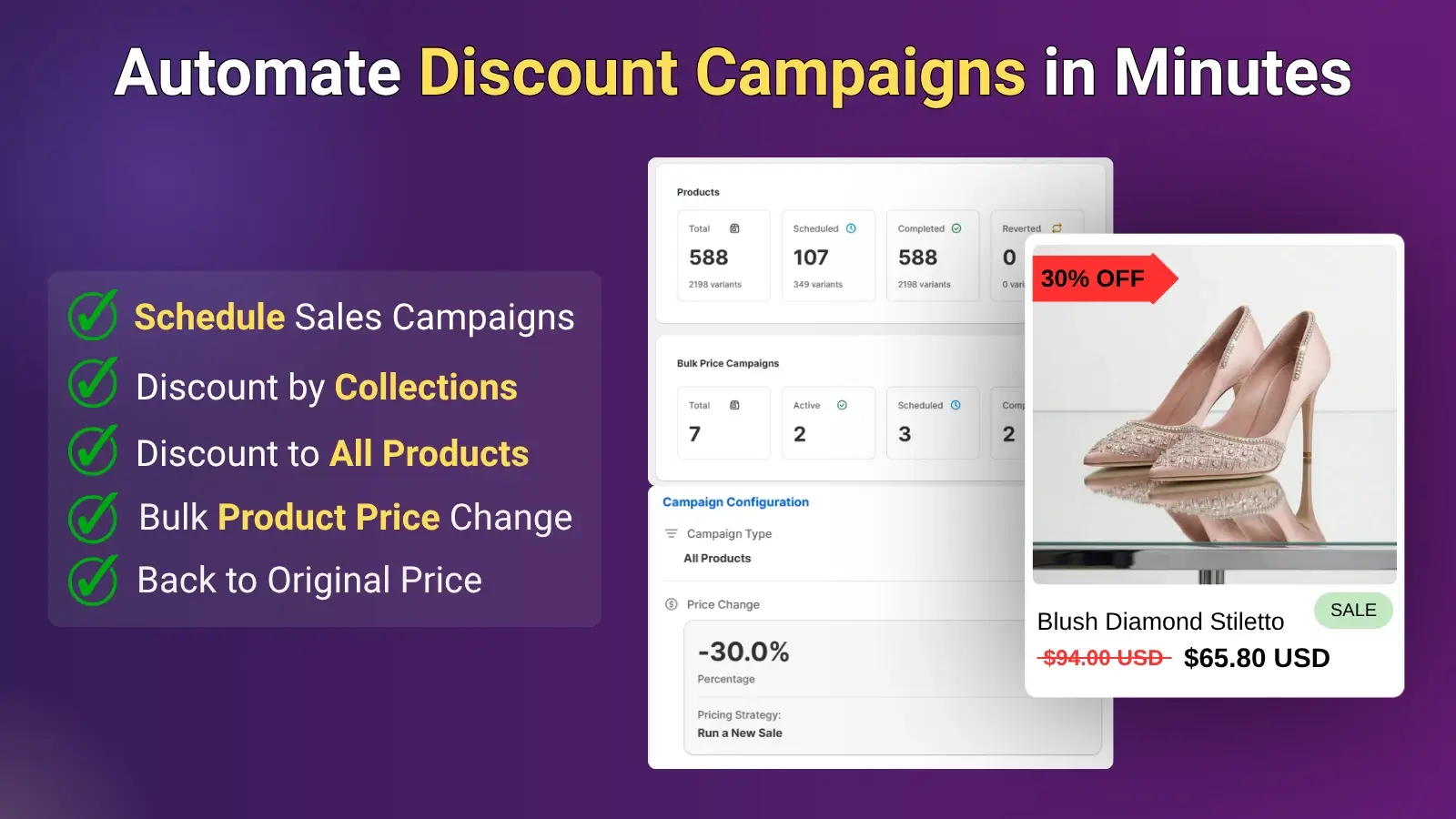
Instead of manually setting up each discount, Revnous helps you
Edit your entire product catalog at once with no limits, updating thousands of products in minutes
Apply discounts using 4 flexible modes: run new sales, adjust active sales, regular updates, or end sales
Keep or revert prices instantly with one click, making testing risk-free
Maintain full control by pausing, resuming, or previewing price change jobs anytime
Schedule campaigns automatically to run at the right time without manual effort
This is especially useful for stores handling the following:
Large inventories
Frequent promotions
Time-sensitive campaigns
By simplifying the technical side of how to launch a discount on Shopify, Revnous allows you to focus more on strategy and less on manual setup.
Final Thought
You should know how to launch a discount on Shopify step by step if you want conversion. The discounts not only help increase sales by convincing your customers to buy ASAP but also help build a lasting bond with them.
The given step-by-step guide shows how to make a discount on Shopify that would result in better profits and attract new clients. Depending on the current situation in the market and the aims of your company, there are various types of discounts that could be applied successfully.
Nevertheless, discounts should be managed efficiently, and it is very important to pay close attention to their use and analyze profitability rates in case you want to have success with your promotional activities. You have to track the performance of your discounts through the Shopify analytics system and learn how to calculate conversion rates and other important metrics.
With time, you can test various discount techniques, such as bundling or loyalty programs, to identify which type works better in promoting your store online and making more money.
Frequently Asked Questions
- What is the Difference Between Automatic Discounts and Discount Codes on Shopify?
- Automatic discounts apply at checkout without requiring a code, while discount codes must be entered manually by customers. Automatic discounts are best for sitewide offers, while codes work well for targeted campaigns.
- Can I Schedule a Discount on Shopify in Advance?
- Yes, Shopify allows you to set a start and end date for your discounts, so they activate and expire automatically without manual intervention.
- Can I Apply Discounts to Specific Products or Collections?
- Yes, Shopify allows you to apply discounts to individual products, specific collections, or your entire store, depending on your campaign goals.
- What is the Best Way to Promote a Shopify Discount?
- You can promote discounts through email marketing, SMS campaigns, social media ads, pop-ups, and banners to maximize visibility and conversions.
- Why is My Shopify Discount Not Working?
- Common reasons include incorrect settings, expired discount dates, unmet conditions (like minimum purchase), or product exclusions.
Ready to Boost Your Revenue?
Join 66,000+ brands already using Revnous to drive sustainable growth